 EMZETT.
Fans
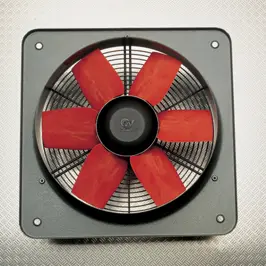 Image: Antonio Mette, CC BY-SA 4.0, Wikimedia Commons


In short: A component for actively cooling hardware — moves air to dissipate waste heat from the CPU, graphics card, power supply, or out of the case.
In more detail: Excessively high temperatures cause “thermal throttling” in CPUs/GPUs (automatic performance reduction to prevent damage) or, in extreme cases, a crash. Alternatives to air cooling are water cooling systems, which carry heat away to a radiator via a liquid.
In Depth
Electronic components inevitably generate waste heat while working — the higher the performance, the more heat has to be dissipated to keep the component within its safe operating temperature. For this, a fan continuously moves air over heatsinks (usually metal fins with a large surface area, mounted directly on the CPU or graphics chip), which absorb heat from the component and release it into the passing air — the more air, and the cooler it is, that passes by, the more effective the cooling.
If a component exceeds its safe temperature limit despite cooling, a protective measure called “thermal throttling” kicks in: the hardware automatically reduces its own clock rate, and thereby power draw, to bring the temperature back down — a noticeable but controlled performance drop that prevents permanent damage from overheating. If cooling remains inadequate for a sustained period, a hard crash can still occur through an emergency shutdown. As a more powerful alternative to air cooling, water cooling systems (custom loops or pre-built “all-in-one” systems) carry heat away via a circulating liquid to a larger radiator, which is in turn cooled by fans — more efficient, and often quieter in operation, but more elaborate to install and maintain.
Fan control and noise
Modern motherboards and power supplies control fans via PWM (pulse-width modulation) with speed regulation, instead of letting them run constantly at full speed — at low temperature they spin slowly (quiet), automatically speeding up (louder, but more effective) as temperature rises. A fixed “always full speed” setting would be the coolest, but unnecessarily loud in the long run. The fan curve (which speed at which temperature) can usually be manually adjusted in the BIOS/UEFI or via manufacturer software, to balance cooling performance and noise level as needed.
Dust filters and airflow concept
Fans inevitably also draw dust from the ambient air into the case, which settles on heatsinks over time and noticeably worsens their effectiveness — regular cleaning (compressed air, dust filters) is therefore part of maintenance. A well-thought-out case airflow concept (fans that specifically draw in cool air, and others that specifically exhaust warm air, instead of blowing uncoordinated in both directions) often improves overall cooling more noticeably than a single, particularly powerful fan.