 EMZETT.
HDMI
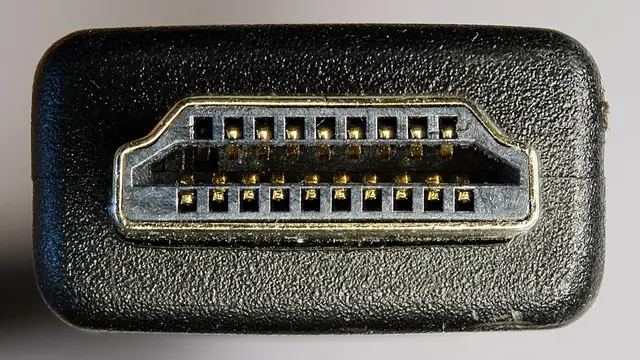 Image: D-Kuru, CC BY-SA 3.0 at, Wikimedia Commons

In short: “High-Definition Multimedia Interface” — a widely used digital connection standard that transmits video and audio over a single cable.
In more detail: HDMI is the de-facto standard for TVs, game consoles and many monitors. Different HDMI versions (e.g. 2.0, 2.1) support different maximum resolutions and refresh rates — the cable and both end devices have to support the desired version.
In Depth
Replacing analogue standards
HDMI was developed by a consortium of major electronics manufacturers to replace analogue transitional solutions like VGA (video only) or SCART, and was the first widely used standard to combine digital video AND audio over a single, thin cable — previously, separate cables for video and audio were needed for this. This combination of easy handling and broad device support quickly made HDMI the standard connector for TVs, projectors, game consoles and most monitors.
Version history and bandwidth
HDMI versions mainly differ in the maximum transmittable bandwidth, which directly limits the possible combination of resolution and refresh rate: HDMI 1.4 (2009), for example, is enough for 4K at 30 Hz, HDMI 2.0 (2013) for 4K at 60 Hz, HDMI 2.1 (2017) enables 4K at 120 Hz or even 8K resolutions. What matters is that the ENTIRE chain — graphics card/source device, cable and target device — supports the same version; a modern HDMI 2.1-capable cable is useless if the TV itself only supports HDMI 2.0.
Additional features of newer versions
Newer versions also bring additional features such as variable refresh rate (VRR) to avoid frame stutter, especially relevant for gaming, as well as “eARC” (enhanced Audio Return Channel), which transmits high-quality multi-channel audio formats back from the TV to a soundbar or AV receiver without needing a separate audio cable. HDCP (High-bandwidth Digital Content Protection) is an additional copy-protection mechanism built into HDMI, which can cause compatibility problems with some older device combinations (e.g. a black screen despite a technically correct connection).
Cable categories
HDMI cables themselves are divided into categories (“Standard”, “High Speed”, “Premium High Speed”, “Ultra High Speed”), each certified for particular bandwidths and resolutions — a very cheap, uncertified cable can cause picture disturbances at high resolutions and long cable lengths, even if it looks no different from a high-quality cable on the outside.
See also: DP (DisplayPort), VGA, Monitor